


Saturday morning, a paperback face-down on the arm of the chair, and the light from the window doing the work. That is the bar an e-reader has to clear. The good news in 2026 is that almost every reader on this list clears it: the screens are sharp, the front lights warm to amber at night, and battery life is measured in weeks, not days. So the decision is no longer about which screen is best. It is about which device matches how you read, and which bookstore it quietly signs you up for.
I did not live with each of these for a month. What I did do is pull the published specifications from Amazon, Rakuten Kobo and the official BOOX store, then cross-check the reading and waterproofing claims against independent reviews at TechRadar and CNN Underscored. The picks below are grouped by job, because a commuter, a bath reader and a margin-scribbler are not shopping for the same thing. We built the TrueAction picks the same way, grouping by the reader rather than the screen, because the panel race quietly ended years ago.
Everyday reading: Kindle Paperwhite (current 7-inch model), around 160 dollars, for the brightest sharp screen and the deepest store. Best value: Kobo Clara BW, around 130 dollars, waterproof and library-friendly for less. Color e-ink: Kobo Libra Colour, around 220 dollars, for page-turn buttons and stylus support in one body. Color on Amazon: Kindle Colorsoft Signature Edition if you are already deep in Kindle. Reading plus serious notes: Kindle Scribe, from around 430 dollars. Cheapest way in: base Kindle, often near 90 dollars, if you never read near water.
Everyday reading: the default pick
If you want one reader for the nightstand and the train, and you do not want to think about formats or library workarounds, the current 7-inch Kindle Paperwhite is the path of least resistance. The screen is the brightest in its class, the adjustable warm light shifts from white to amber for late reading, and it carries an IPX8 rating, so a poolside drop into shallow water is a non-event. The reason most people end up here is not the hardware though. It is that the Kindle store and Kindle Unlimited are simply the largest and the easiest to buy into on the device itself.
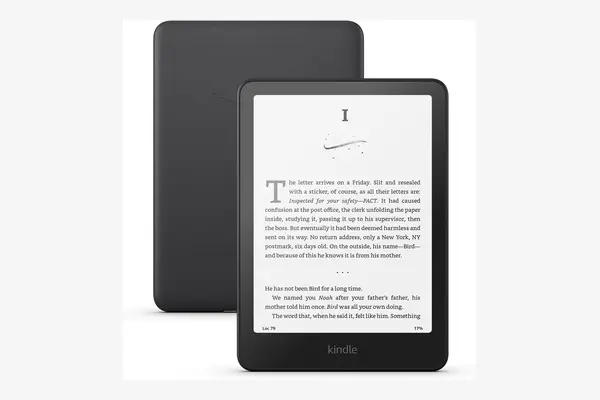
Kindle Paperwhite (current 7-inch)
around 160 to 200 dollars as of April 2026, depending on storage and the ad-free Signature Edition
This is the safe default for a reason. The 7-inch, 300 ppi display is sharp and the front light goes brighter than any rival here, which matters in real daylight. Adjustable warm light, IPX8 waterproofing and USB-C charging are all present, and Amazon quotes battery life in the range of weeks rather than days. The one tradeoff is the store: Amazon's formats lock your purchased library to Amazon devices and apps, and borrowing US library books through Libby works but takes an extra step compared with Kobo. If you do not care about that, this is the one to beat.
The Signature Edition adds 32GB, an auto-adjusting front light and Qi wireless charging for roughly 40 dollars more, and drops the lockscreen ads. None of that changes how the words land on the page, so treat it as a convenience upgrade rather than a reading upgrade. The caveat stands either way: you are buying into Amazon's bookstore, not just a screen.
Best value: less money, same comfort
Spending less does not mean giving up the things that matter. The Kobo Clara BW proves it. You get the same 300 ppi sharpness as the Paperwhite, a warm-to-cool ComfortLight PRO front light, and full IPX8 waterproofing, all in a pocketable 6-inch body for roughly 30 dollars less. The trade is screen size and the smaller, less flashy ecosystem. What you gain in return is OverDrive and Libby support built right into the device, so borrowing library books is genuinely a one-time card sign-in rather than a workaround.
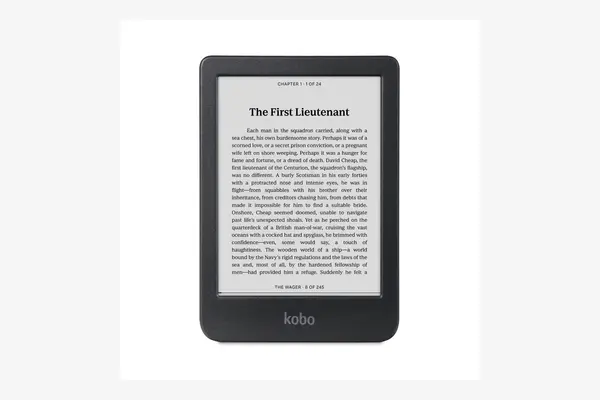
Kobo Clara BW
around 130 to 140 dollars as of April 2026
Kobo's compact reader uses a current-generation Carta 1300 E Ink panel that reviewers at TechRadar rated as one of the crispest monochrome screens shipping today. It is waterproof to IPX8, the ComfortLight PRO light warms to amber at night, and Kobo quotes battery measured in weeks of normal reading. Because Kobo reads EPUB natively and bakes OverDrive into the menu, library borrowing is the cleanest of any device here. The tradeoff is the 6-inch screen and a quieter store: Kobo's catalog and audiobook selection are smaller than Amazon's, so heavy buyers may find the occasional title missing. For library-first readers, that is a fair price to pay.
If the 6-inch screen feels cramped after a paperback, look at the base Kindle instead. It is the cheapest way onto an e-reader, often near 90 dollars, with the same 300 ppi sharpness, but it has no waterproofing and a plain white front light with no warm-amber shift. The caveat is simple: never take it near a bath, a pool or a beach.
Color e-ink: worth it for some
Color e-ink in 2026 still uses Kaleido 3 panels, which means a real compromise you should understand before you spend. Black text stays at 300 ppi and looks like any other e-reader. Color, though, drops to roughly 150 ppi and looks muted, more like a faded comic than a glossy tablet, with a faint texture over the whole screen. It is wonderful for book covers, comics, manga and highlighting, and underwhelming if you expect tablet-grade color. Pay for it only if those use cases are real for you.
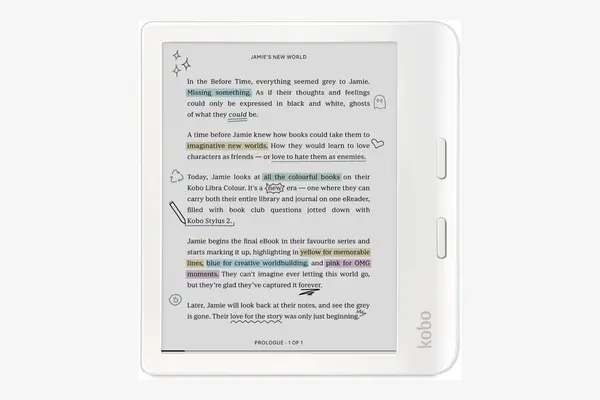
Kobo Libra Colour
around 220 dollars, plus around 50 dollars for the optional Kobo Stylus 2, as of April 2026
This is the most versatile color reader on the list. The 7-inch Kaleido 3 screen is waterproof to IPX8, the body has physical page-turn buttons that most color readers drop, and it accepts the Kobo Stylus 2 for marking up pages and a built-in notebook. With 32GB of storage and native EPUB plus OverDrive, it inherits Kobo's library advantage. The tradeoff is the same one every Kaleido device carries: color is muted and lower resolution than the crisp black text, and the stylus is a separate purchase that is not itself waterproof. For a reader who wants color, buttons and light note-taking in one hand, nothing else here does all three.
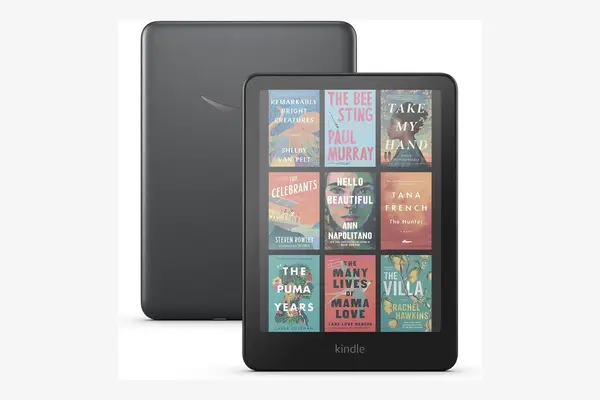
Kindle Colorsoft Signature Edition
launched around 280 dollars and has dropped toward 170 dollars in 2026 sales, so confirm current price before buying
If your library already lives in Amazon's store, this is the color reader to get. The 7-inch Colorsoft panel is waterproof, supports color highlights in four shades, charges over USB-C or a wireless dock, and Amazon quotes up to eight weeks of battery. It reads as a Paperwhite that learned color, which is exactly its appeal and its limit. The tradeoff is value: at full launch price it cost a lot for muted Kaleido color, though steep 2026 discounts have made it far more sensible, so the price you see on the day decides whether it beats the Libra Colour. Early units also drew complaints about a yellow band at the screen bottom, since addressed, but worth reading recent owner reviews on.
Cheaper color exists. The Kobo Clara Colour brings Kaleido 3 to the compact 6-inch body for around 150 dollars, which is the lowest-cost route to color e-ink worth recommending. It keeps waterproofing and the Kobo library perks, but loses the page-turn buttons and stylus support of the Libra. The caveat across all three: do not buy color expecting your phone screen, because Kaleido is a softer, paper-like color by design.
Reading plus notes: a different device
Note-taking e-readers are a separate purchase decision, not a nicer version of a reading e-reader. They are bigger, heavier and far pricier, and you are paying for a large writing surface and pen latency that feels close to paper. If you only want to scribble the occasional margin note, the Kobo Libra Colour above already covers it. If you want a genuine digital notebook that also reads books, this is the tier.
Kindle Scribe (current)
around 430 dollars for the entry version up to roughly 550 dollars for 64GB with the front-lit model, as of April 2026
The Scribe pairs an 11-inch, 300 ppi writing surface with a Premium Pen that attaches magnetically and never needs charging. The current generation is noticeably thinner and faster than the original, and Amazon has layered in AI note tools that summarize and search your handwriting. As a reader it is the full Kindle store experience on a large page. The tradeoffs are size, price and the same Amazon lock-in as every Kindle: it is too big for one-handed couch reading, and the entry model omits the front light, so step up if you read in the dark. There is also a pricier Colorsoft version of the Scribe if color notes matter, but most note-takers will not need it.
An outside option for the format-flexible: the BOOX Go 7 and Go Color 7 Gen II run full Android 13 at around 250 to 270 dollars, so they open the Kindle app, the Kobo app, Libby and almost anything else on one 7-inch e-ink screen. That openness is the whole pitch. The caveat is that Android on e-ink is fiddlier and slower than a locked-down Kindle or Kobo, so buy a BOOX only if running multiple stores on one device is the reason you are shopping at all.
The screen stopped being the decision years ago. In 2026 you are really choosing a bookstore, and the hardware is how you carry it.
| Model | Screen | Color | Waterproof | Pen | Approx. price |
|---|---|---|---|---|---|
| Kindle Paperwhite | 7 in, 300 ppi | No | IPX8 | No | ~160 to 200 dollars |
| Kobo Clara BW | 6 in, 300 ppi | No | IPX8 | No | ~130 to 140 dollars |
| Base Kindle | 6 in, 300 ppi | No | None | No | ~90 to 110 dollars |
| Kobo Libra Colour | 7 in Kaleido 3 | Yes, 150 ppi | IPX8 | Optional | ~220 dollars |
| Kobo Clara Colour | 6 in Kaleido 3 | Yes, 150 ppi | IPX8 | No | ~150 dollars |
| Kindle Colorsoft | 7 in Colorsoft | Yes | Yes | No | ~170 to 280 dollars |
| Kindle Scribe | 11 in, 300 ppi | No | No | Included | ~430 to 550 dollars |
| BOOX Go 7 series | 7 in, 300 ppi | Color option | No | Optional | ~250 to 270 dollars |
For most readers, no. Color e-ink still uses Kaleido 3 panels, where black text stays at 300 ppi but color drops to roughly 150 ppi and looks muted, with a faint texture over the screen. It is genuinely nice for book covers, comics, manga and color highlights, and a letdown if you expect tablet-grade color. Pay the premium only if those specific uses are real for you.
It comes down to the bookstore. Kindle has the largest store, Kindle Unlimited and the smoothest buying experience on the device, but it locks purchased books to Amazon's formats and apps. Kobo reads EPUB natively and builds OverDrive and Libby into the menu, so borrowing US library books is a one-time card sign-in instead of a workaround. Pick Kindle if you buy most of your books from Amazon, and Kobo if you borrow from the library or want open formats.
Only if you read where water is, such as the bath, the pool or the beach. The IPX8 rating on the Paperwhite, both Kobo Claras and the Libra Colour means a brief drop into shallow fresh water is survivable, not that the device is built for swimming. The base Kindle skips waterproofing entirely to hit its low price, so if you only ever read on the couch or the train, you can save the money.
Buy the Kindle Paperwhite if you want the easiest, brightest everyday reader and you live in Amazon's store. Buy the Kobo Clara BW to spend less and borrow library books without friction. Buy the Kobo Libra Colour if you want color, page-turn buttons and a stylus in one body, or the Kindle Colorsoft if your library is already on Amazon and the discount is live. Step up to the Kindle Scribe only when notes matter as much as reading. The screen is no longer the decision, so choose the store you want to live in and pick the body that carries it best.