


Three things decide a work keyboard, and only one of them shows up in the marketing. The first is how loud it is when you type fast, measured in decibels in a quiet room, not described as quiet on the box. The second is how many devices it switches between, because most desks now have a laptop and a personal machine sharing one keyboard. The third is the typing feel: low-profile scissor for silence, low-profile mechanical for travel, full-height mechanical for the deepest stroke, and a split layout if your wrists are paying for years of a flat board. Get the noise and the feel right and the backlight, the macros, and the keycap material sort themselves out.
How these are ranked
The order here is built from documented specs alongside lab numbers from outlets that measure this stuff, not from a month of typing on each board ourselves. Inside each group the order reflects typing comfort over long sessions, then measured noise, then multi-device pairing and battery, then price. A keyboard called quiet only earns the word if a lab put a meter next to it; RTINGS clocked the MX Keys S near 35 dB, among the lowest of any wireless board tested, while a clicky mechanical can sit 20 dB higher, which is roughly four times as loud to the ear. Where a switch is sold as silent without a number, we say so and rank on what the meter shows. That meter-over-adjective rule is the whole basis of how we score a work keyboard here.
- Noise is a number, not an adjective. Scissor and low-profile tactile-quiet switches land in the mid 30s dB. Standard tactile and linear mechanicals sit in the high 40s to low 50s. Clicky switches are louder again. In a shared room or on calls, that gap decides whether anyone notices you.
- Low-profile is a feel, not a guarantee of quiet. A low-profile mechanical is shorter to travel and easier on the wrist than a tall board, but a low-profile linear switch is still a mechanical and still louder than a scissor. Do not confuse the slim case with a silent typewriter.
- Multi-device pairing is the office feature that matters. Logitech's Easy-Switch and the tri-mode Keychron and Nuphy boards hold three connections and jump between them with a key. A board that pairs to one device is a board you unpair and repair all day.
- Battery is quoted two ways, and the small number is the real one. Makers print the lights-off figure in months and bury the backlight-on figure in days. The MX Mechanical is rated about 15 days with the backlight on and 10 months off; plan around the days, not the months.
Quiet office picks
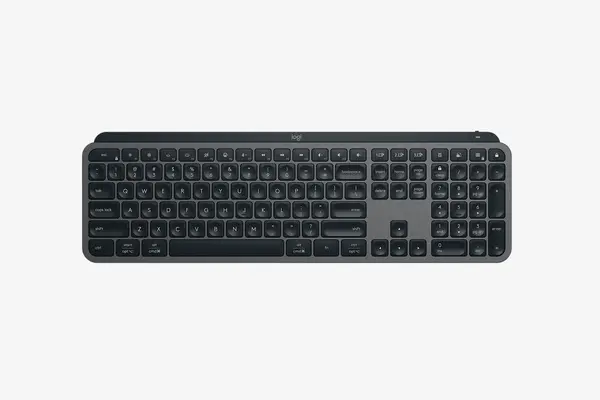
Logitech MX Keys S
Around 95 to 130 dollars as of February 2026
This is the keyboard most office workers should buy. It is a low-profile scissor board, not mechanical, with spherically dished keys that RTINGS measured at roughly 35 dB while typing, among the quietest wireless boards anyone has put a meter to. It pairs to three devices over Bluetooth or the Logi Bolt receiver and jumps between them with the Easy-Switch row, charges over USB-C, and runs about 10 days with the proximity backlight on or up to 5 months with it off. The tradeoff is honest: there is no mechanical travel or tactile bump, so if you want the feel of switches you will not find it here. For shared rooms, video calls, and long days of email, the silence and the three-device switching are why it leads.
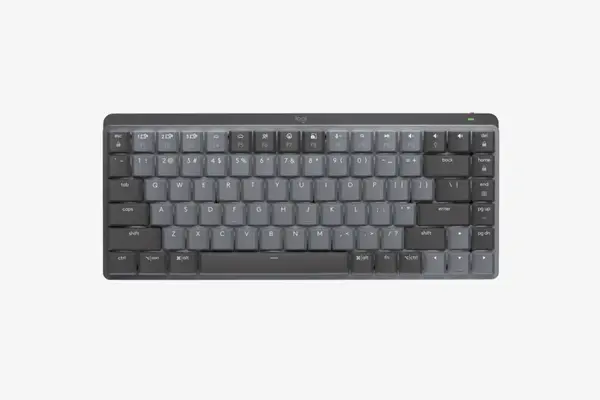
Logitech MX Mechanical Mini (Tactile Quiet)
Around 130 to 150 dollars as of February 2026
If you want a real switch under your fingers but cannot be the loudest desk in the room, this is the compromise. It is a 75% low-profile mechanical, so it gives a genuine tactile bump and shorter travel than a full-height board while the Tactile Quiet switch is the dampened option Logitech tuned for shared offices. It carries the same three-device Easy-Switch, USB-C charging, and proximity backlight as the MX Keys S, rated about 15 days lit or up to 10 months dark. Two tradeoffs: the switch is chosen at purchase and is not hot-swappable, so pick Tactile Quiet over Clicky or Linear if noise is the point, and the compact 75% layout drops the dedicated numpad. For a typist who wants mechanical feel without a clatter, it is the pick.
Mechanical picks
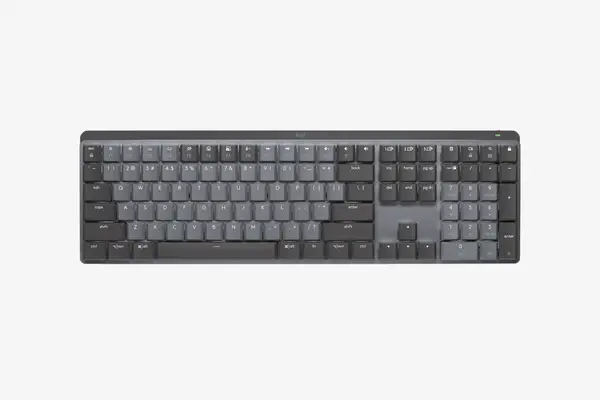
Logitech MX Mechanical (full size)
Around 130 to 170 dollars as of February 2026
The full-size MX Mechanical is the MX Mechanical Mini with a numpad bolted back on, for anyone who lives in spreadsheets. It is low-profile mechanical with the same three switch choices set at purchase, Tactile Quiet, Clicky, or Linear, and the same three-device Easy-Switch and USB-C charging rated near 15 days backlit. The integrated numpad and the slim profile keep your wrist flatter than a tall full-size board does. The tradeoffs are the same family ones: the switch is fixed and not hot-swappable, and the Linear and Clicky options are noticeably louder than the Tactile Quiet, so for an office choose Tactile Quiet unless you have a room to yourself. For accounting, data entry, or anyone who refuses to give up the numpad, this is the full-size mechanical to get.
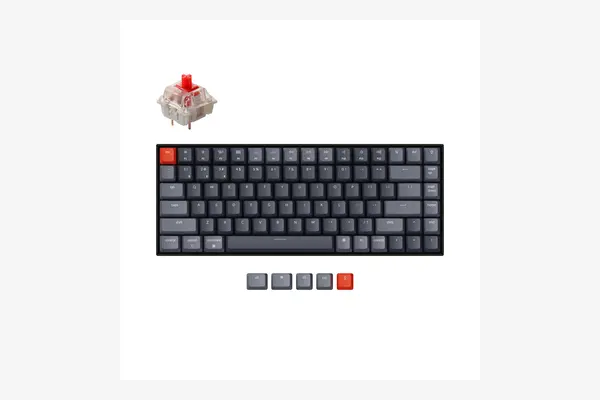
Keychron K2 V2 (Hot-swappable)
Around 90 to 100 dollars as of February 2026
This is the cheapest pick here and the one you can tune to your ear. It is a 75% full-height mechanical with hot-swappable sockets, so you can pull the stock Gateron G Pro switches and drop in quieter or heavier ones without soldering, which is the only board on this list that lets you fix the noise yourself. It connects over Bluetooth to up to three devices or runs wired, and the aluminum-frame version feels far more solid than the price suggests. Two honest tradeoffs: it is a tall, full-height board, so it sits higher than the low-profile Logitechs and benefits from a wrist rest, and the stock Gateron switches out of the box are ordinary office-loud in the high 40s dB until you swap them. For a tinkerer on a budget, the hot-swap sockets make it the most flexible board here.
Nuphy Air75 V2
Around 110 to 120 dollars as of February 2026
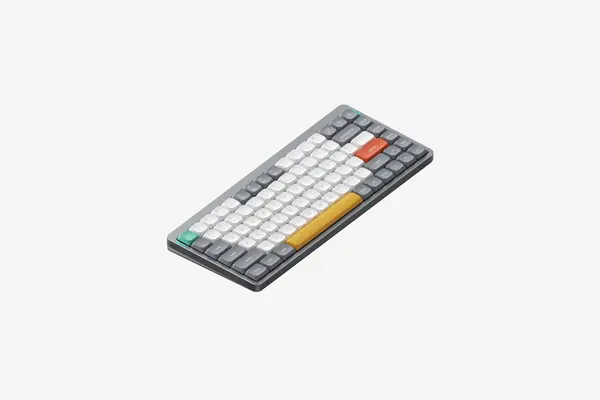
If the keyboard moves between home, office, and a bag, this is the one to carry. It is a 75% low-profile mechanical at about 0.58 inches thick, with hot-swappable low-profile sockets, double-shot PBT keycaps that resist shine, and QMK/VIA firmware for remapping keys on the keyboard itself rather than through a phone app. It is tri-mode, so it runs over a 1000Hz 2.4GHz dongle, Bluetooth to multiple devices, or USB-C, and the 4000 mAh battery is rated for tens of hours with the RGB on and into the low hundreds of hours with it off. The tradeoffs: it is a low-profile mechanical, so it is louder than the MX Keys S scissor board, and the deep customization through QMK is more setup than the plug-and-type Logitechs. For a portable board that types like a real mechanical, it is the travel pick.
Ergonomic picks
Logitech Ergo K860
Around 100 to 130 dollars as of February 2026
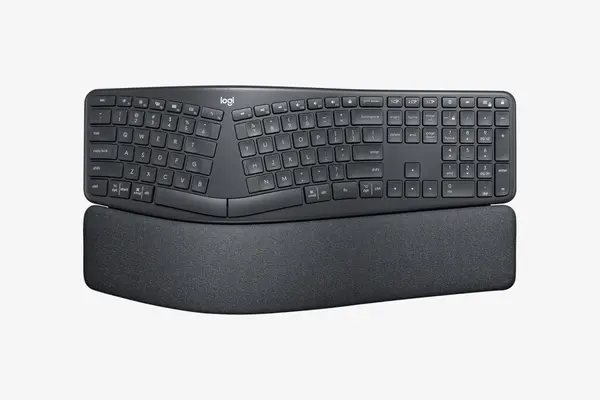
If your wrists ache after years on a flat board, this is the low-risk way out. It is a one-piece split-curve keyboard with a fixed gap down the middle, a tented center, and a built-in pillowed wrist rest, so it keeps your forearms in a more neutral position without the learning curve of a fully separated split. The keys are membrane, not mechanical, which keeps it quiet, and it pairs over Bluetooth or the Logi Bolt receiver to multiple machines and runs on AAA batteries rather than a recharge. The tradeoffs are real: the keys are membrane, so there is no mechanical feel, and it runs on disposable batteries instead of USB-C. The split is also fixed, with no option to separate the halves further. For comfort with almost no adjustment period, it is the easiest ergonomic board to live with.
Compared on the numbers
| Keyboard | Switch type | Layout | Typing noise | Devices | Price (Feb 2026) |
|---|---|---|---|---|---|
| Logitech MX Keys S | Scissor | Full size | ~35 dB (lab) | 3 | ~95 to 130 |
| Logitech MX Mechanical Mini | Low-profile mech (Tactile Quiet) | 75% | Quiet for mech | 3 | ~130 to 150 |
| Logitech MX Mechanical | Low-profile mech (3 options) | Full size | Varies by switch | 3 | ~130 to 170 |
| Keychron K2 V2 Hot-swap | Full-height mech (hot-swap) | 75% | ~High 40s dB stock | 3 (BT) | ~90 to 100 |
| Nuphy Air75 V2 | Low-profile mech (hot-swap) | 75% | Louder than scissor | Tri-mode | ~110 to 120 |
| Logitech Ergo K860 | Membrane (split-curve) | Full size | Quiet | Multi | ~100 to 130 |
Quiet is a number a lab measures, not a word on the box. The scissor board lands near 35 dB. The clicky mechanical sits 20 dB above it, which the whole room hears.
Frequently asked questions
A low-profile scissor board, not a mechanical. RTINGS measured the Logitech MX Keys S at roughly 35 dB while typing, among the lowest of any wireless keyboard tested, because scissor switches have short travel and no tactile click. A standard mechanical, even a tactile or linear one, sits in the high 40s to low 50s dB, and a clicky switch is louder again. If you want some switch feel while staying quiet, the MX Mechanical Mini with the Tactile Quiet switch is the dampened middle ground, but it is still louder than the scissor MX Keys S. For calls and open-plan rooms, the scissor board is the safe pick.
For a desk that doubles as a typing station, usually yes, but for the wrist angle, not the noise. A low-profile mechanical like the Nuphy Air75 V2 or the Logitech MX Mechanical has shorter key travel and a slimmer case, so your hand sits flatter and closer to a laptop posture, which many people find more comfortable for long sessions than a tall full-height board. What low-profile does not do is make the switch quiet on its own; a low-profile linear is still a mechanical and still louder than a scissor board. So choose low-profile for the slimmer feel and easier wrist angle, and choose the switch, ideally a tactile-quiet or dampened one, for the noise. The two are separate decisions.
Only if your wrists or forearms hurt on a flat board. A split or split-curve keyboard like the Logitech Ergo K860 lets your hands sit shoulder-width with the wrists straighter, which reduces the sideways bend that causes strain for some people over years of typing. If you have no discomfort, a regular low-profile board with a wrist rest is fine and cheaper, and you avoid the adjustment period. If you do have aches, the K860 is the gentlest on-ramp because it is one piece with a fixed gap and a built-in wrist rest, so the learning curve is short; a fully separated split like a Keychron Q11 gives more adjustment but takes longer to relearn. Buy for comfort you actually need, not for the look.
Need the quietest desk for calls and email? The Logitech MX Keys S is the scissor pick near 35 dB. Want a switch under your fingers without the clatter? Reach for the Logitech MX Mechanical Mini in Tactile Quiet, or step up to the full-size MX Mechanical, also in Tactile Quiet, when a numpad is non-negotiable. If you would rather tune the noise yourself on a budget, the hot-swappable Keychron K2 V2 is the one to open up. For a board that moves between home, office, and a bag, carry the low-profile Nuphy Air75 V2. And when your wrists are paying for years on a flat board, the split-curve Logitech Ergo K860 is the gentlest fix. Settle the noise and the typing feel for your room first, then match the layout to the job, and add a wrist rest to any tall board.