


Step away from a window and watch your face go grainy and grey on the next call. That is the 720p camera most laptops sold before 2022 still carry, on a sensor barely larger than a grain of rice, doing the best it can with too little light. Premium laptops from Apple, Dell and Lenovo have moved to 1080p sensors with auto-framing, so if yours is recent you may not need anything at all. But for everyone on an older or budget machine, an external webcam is the rare upgrade that costs under a hundred dollars and that every single person on the call can see. The trick is not overpaying for resolution your video app throws away. That is why TrueAction sorts these picks by the job you do on camera rather than the megapixel count, so you never pay for 4K your callers cannot see.
Best overall: the Logitech MX Brio, a genuine 4K sensor with the cleanest 1080p output here. Best for the money: the Anker PowerConf C200 at around sixty dollars. Best for streamers and movers: the Insta360 Link 2, which physically tracks you around the room. The rest of this guide sorts the picks by the job you actually do on camera, because a finance webcam and a Twitch webcam want very different things.
What an external cam actually fixes
The number on the box is the least interesting spec. Almost every video app, Zoom, Teams, Google Meet, sends 720p or 1080p over the wire no matter what your camera captures, so the 4K on a premium webcam is rarely seen at full resolution by the people you are talking to. What you are really buying is a bigger sensor and a wider lens aperture, and those fix the things a tiny built-in camera cannot: low light, color and depth. A 4K sensor downscaled to 1080p still sends a cleaner, more detailed image than a native 1080p chip, which is the honest reason to consider 4K even on a 1080p call.
A larger sensor with a wide aperture, f/2.0 or lower, gathers more light, so it stays clean in a dim home office where a built-in camera turns to noise. This is the single biggest jump you will see and the spec most buyers skip.
Cheap and built-in cameras use fixed focus that softens when you lean in. Autofocus keeps you sharp, and AI framing pans and crops to keep you centered if you move, which matters more for presenting than any resolution number.
Pay for 4K if you record video, edit later, or crop in tight; the captured detail is real then. For meetings alone, a strong 1080p or 2K camera looks identical to your callers and costs far less.
The six picks
The 4K cameras
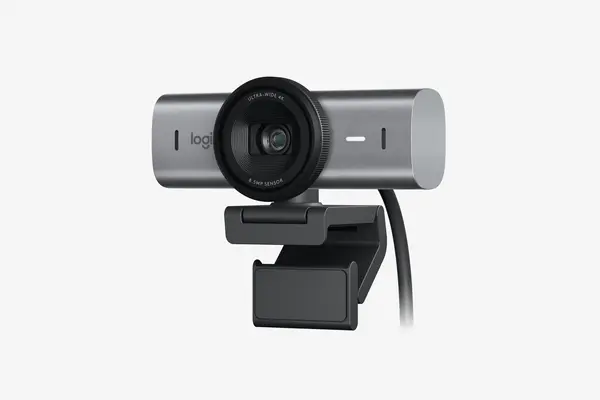
Logitech MX Brio
Around $170 to $200 as of June 2026 (list near $199.99, often $170 on sale)
If you want one camera that looks great on calls today and holds up when you record, this is it. The MX Brio shoots 4K at 30fps or 1080p at 60fps off an 8.5MP Sony STARVIS sensor that Logitech says is twice the physical size of the old Brio 4K Pro, and that bigger sensor is exactly why reviewers single out its low-light handling and clean downscaled 1080p. You get three selectable fields of view at 65, 78 and 90 degrees, closed-loop autofocus, and Logi Options+ controls for white balance and exposure. The honest tradeoff is that several reviewers note it is tuned for flattering conference video rather than the saturated, punchy look streamers chase, and there is no privacy shutter, only a soft cover. For most people doing serious video calls, it is the safe and durable buy.
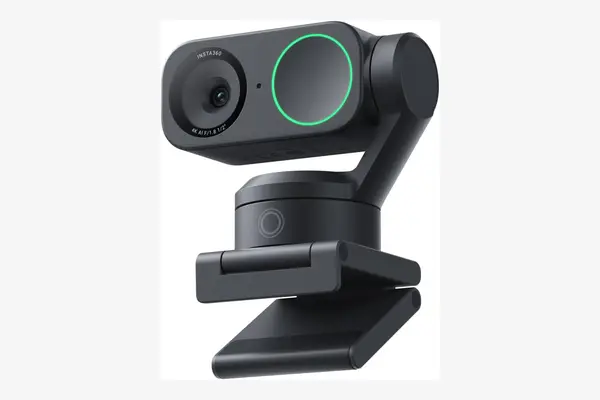
Insta360 Link 2
Around $199.99 as of June 2026
This is the camera to buy if you move while you talk, teach, demo a product, or pace during a stream. The Link 2 sits on a motorised gimbal, the same kind used on drones, so it physically pans and tilts to follow you around the room instead of just digitally cropping. It captures 4K off a 1/2-inch sensor, supports HDR and AI noise-cancelling mics, and adds hands-free gesture control to start tracking, zoom or trigger a whiteboard mode. The tradeoffs are real: the moving gimbal is a part that can wear, the tracking occasionally hunts, and at two hundred dollars you are paying for motion features a static talking-head setup never uses. If you sit still for meetings, save the money. If you present, it earns its keep.
The 1080p specialists
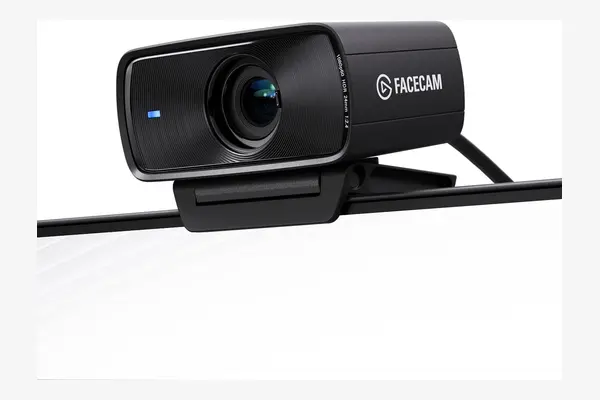
Elgato Facecam MK.2
Around $149.99 as of June 2026
Elgato skipped the 4K race here on purpose, and for streaming that choice holds up. The Facecam MK.2 sends uncompressed 1080p at 60fps off a 1/2.5-inch Sony STARVIS sensor through an f/2.4 Elgato Prime lens with an 84-degree field of view, and the uncompressed feed plus the Camera Hub software give you the manual exposure, white balance and color control streamers actually want. It also does 720p at 120fps for slow-motion. The catch is the price-to-spec ratio: at a hundred and fifty dollars you are paying 4K money for a 1080p camera, and reviewers note the body is fairly plasticky and there is no built-in mic, so you supply your own audio. For a controlled, well-lit streaming desk it is excellent; for a casual meeting camera it is overkill.
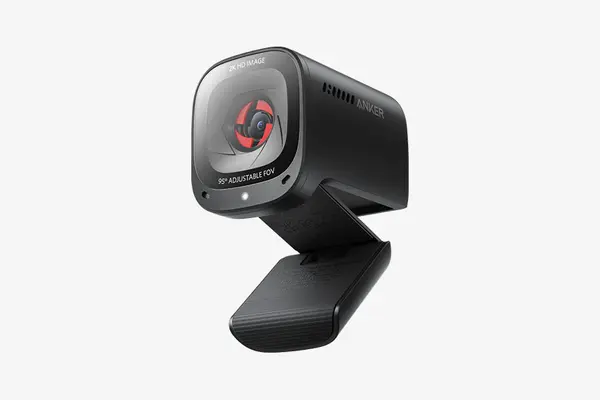
Anker PowerConf C200
Around $60 as of June 2026
For most people upgrading from a built-in camera, this is the smart amount to spend. The PowerConf C200 captures 2K, or 1440p, which sits neatly above 1080p without the cost or the wasted detail of 4K on calls, and it bundles the things people forget to check: a built-in privacy cover, dual stereo mics with AI noise reduction, low-light correction and three adjustable fields of view at 65, 78 and 95 degrees through Anker's software. Reviewers consistently rate it a strong budget pick. The tradeoffs match the price: autofocus is solid but not as quick as the Logitech, and the plastic build feels its cost. If you do regular video calls and do not stream, this clears the bar for a third of the price of the flagships.
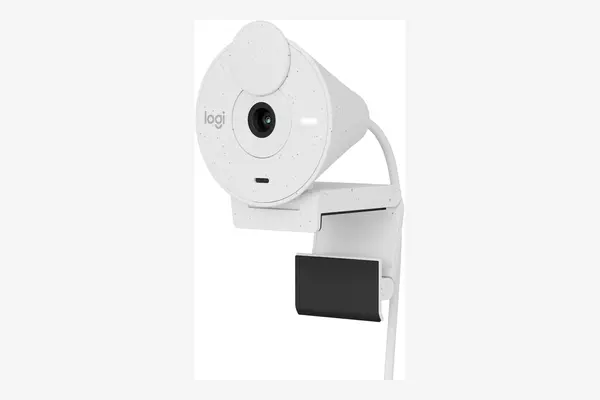
Logitech Brio 300
Around $69.99 as of June 2026
When you just want a clear face and nothing fancy, this is where to stop spending. The Brio 300 shoots 1080p at 30fps with an autofocusing glass lens, a 70-degree field of view, RightLight 2 auto-exposure and a noise-reducing mic, all over a single USB-C cable with a physical privacy shutter built in. Tom's Hardware called its image only mediocre, and that is fair: it will not beat the bigger-sensor cameras in dim light or hold a candle to the MX Brio. But it is a real, plug-and-play upgrade over a 720p built-in camera, it is made partly from recycled plastic, and at seventy dollars it asks for very little. Buy it for occasional calls where you want to look tidy, not impressive.
The laptop specialist
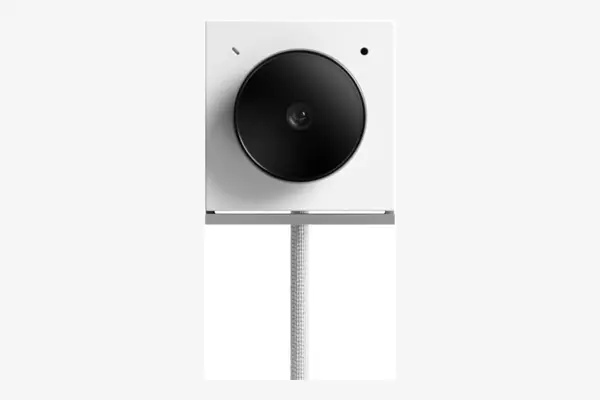
Opal Tadpole
Around $130 to $175 as of June 2026 (list near $175, often $130 on sale)
This is the niche pick for people who work from their laptop lid and refuse to carry a stand. The Tadpole is tiny, clips to a laptop screen, and packs a 48MP Sony sensor behind a bright f/1.8 lens, which is a genuinely big aperture for low light. It plugs in over USB-C and folds away into a pocket. The catches are specific and worth knowing before you buy: the narrow clip does not grip thick desktop monitors, so it is really laptop-only, and reviewers describe the experience as great in idea but rough in places, with quirks in the software and framing. If you live in coffee shops and meeting rooms with only a laptop, it is a clever travel camera. For a desk with a monitor, skip it and buy the MX Brio or the Anker.
The resolution on the box is what the camera sees. The sensor size is what your callers see. Spend on the second one.
Compared on the numbers
| Webcam | Max video | Sensor / FOV | Best for | Price (Jun 2026) |
|---|---|---|---|---|
| Logitech MX Brio | 4K30 / 1080p60 | 8.5MP Sony / 65-90 | Best overall | ~$170-200 |
| Insta360 Link 2 | 4K | 1/2 in / gimbal PTZ | Streamers, movers | ~$199 |
| Elgato Facecam MK.2 | 1080p60 | 1/2.5 in Sony / 84 | Streaming desk | ~$150 |
| Anker PowerConf C200 | 2K | 65-95 adjustable | Best value | ~$60 |
| Logitech Brio 300 | 1080p30 | 70, fixed | Cheapest worth it | ~$70 |
| Opal Tadpole | Up to 4K | 48MP Sony / f/1.8 | Laptop travel | ~$130-175 |
Frequently asked questions
For video calls alone, 1080p is plenty, because Zoom, Teams and Meet send your callers 720p or 1080p no matter what your camera captures, so the extra 4K detail is thrown away before it ever reaches them. The reason to consider 4K is what it does to the 1080p you do send: a 4K sensor downscaled to 1080p produces a cleaner, more detailed image than a native 1080p chip, and it gives you headroom to crop in if you also record video. So buy 4K, like the Logitech MX Brio, if you record or want the cleanest possible call image; buy a strong 1080p or 2K camera, like the Anker PowerConf C200, if you only do meetings and want to spend less.
It depends on your laptop and how often you are on camera. Premium laptops from Apple, Dell and Lenovo from the last couple of years ship 1080p sensors with auto-framing that are genuinely good, and if you have one of those and only call occasionally, you do not need anything. But most laptops sold before 2022, and many budget models still, use a tiny 720p sensor that looks noisy and washed out in anything short of bright daylight. If you do video calls regularly for work, teaching, interviews or streaming, a webcam with a larger sensor and a wider aperture is a dramatic, visible upgrade, and the cheap ones start around sixty dollars. If you rarely call, save your money.
A good one helps a lot, and it comes down to two specs more than any software trick. The first is sensor size: a physically larger sensor, like the 8.5MP Sony chip in the Logitech MX Brio, gathers far more light than the pinhead sensor in a built-in camera, so it stays clean instead of turning to grain. The second is aperture: a lower f-number, such as the f/1.8 lens on the Opal Tadpole, lets in more light. Most decent webcams also add auto light correction, branded RightLight on Logitech models, which lifts a dim image. None of it replaces a lamp, though. The cheapest fix for bad video is a light facing you, and even a window beats most camera processing.
Start with what you actually do on screen and the choice gets simple. If you want one camera that handles serious calls and the occasional recording, the Logitech MX Brio covers both. If you only meet and want to spend the smart amount, the Anker PowerConf C200 lands it at around sixty dollars. Streamers working a lit desk with their own mic should reach for the Elgato Facecam MK.2, while anyone who presents or paces while talking wants the Insta360 Link 2 and its tracking gimbal. For a clean face on occasional calls without spending much, the Logitech Brio 300 is enough, and people who live out of a laptop bag are best served by the Opal Tadpole. Two things decide the rest: your lighting, which sets how big a sensor you need, and how much you move, which sets the features. The resolution number on the box decides almost nothing.